
An accessible website is one that people with disabilities can perceive, understand, navigate and use, including people who are blind or deaf and people with low vision, limited mobility or cognitive disabilities. Nonprofit website accessibility is part of the mission, not a technical extra. If a donor cannot complete your form with a keyboard, or a client cannot read your program page with a screen reader, your website is turning people away. This guide explains the standards in plain terms and lays out a practical plan.
In short: Most private nonprofits that serve the public are evaluated under ADA Title III, which has no formal technical standard for websites; WCAG 2.1 or 2.2 Level AA is the common benchmark. State and local government entities fall under the DOJ’s 2024 Title II rule, which requires WCAG 2.1 AA. Start with an audit, fix the most common barriers and build accessibility into every update.
This page is general information, not legal advice. Talk to qualified counsel about your organization’s obligations.
What website accessibility means
Web accessibility means designing and coding a site so that everyone can use it, including people who rely on assistive technology. Examples include screen readers that read text aloud, captions for people who are deaf or hard of hearing, keyboard-only navigation and voice control software. The Department of Justice’s web guidance describes the same barriers that show up on many nonprofit sites: poor color contrast, missing alt text, videos without captions, inaccessible forms and mouse-only navigation.
Why it matters for nonprofits
The first reason is mission fit. Many nonprofits serve older adults, veterans, people with disabilities or people with limited internet access. Think of a veteran with low vision who zooms in to read your benefits page, only to find the menu breaks and the text runs off the screen. An accessible site serves the people you exist to help, directly.
Money is part of it too. Donation, event and volunteer forms that fail for some users cost you support, often without anyone noticing. Government contracts and some funders include accessibility requirements, and inaccessible websites can lead to complaints and legal claims. The upside reaches everyone: clear headings, readable contrast and simple forms help every visitor, especially on phones.
ADA and WCAG: the basics
The Americans with Disabilities Act (ADA) and the Web Content Accessibility Guidelines (WCAG) are different things. The ADA is a civil rights law. WCAG is a technical standard published by the World Wide Web Consortium (W3C).
Title II: government entities
In April 2024, the DOJ published a final rule under ADA Title II that requires state and local government web content and mobile apps to meet WCAG 2.1 Level AA. On April 20, 2026, an interim final rule extended the compliance dates by one year: April 26, 2027, for public entities with a population of 50,000 or more, and April 26, 2028, for smaller entities and special district governments. The rule covers content a public entity provides directly or through contracts. If your nonprofit runs a website or app for a state or local agency, ask counsel whether that content is in scope.
Title III: private nonprofits
Private nonprofits that serve the public generally fall under Title III, which covers public accommodations. The DOJ’s 2022 guidance states that the department has consistently applied the ADA to goods and services offered online, but it does not have a regulation setting detailed web standards for these organizations. It describes WCAG and the Section 508 standards as helpful guidance. In practice, WCAG 2.1 or 2.2 Level AA is the benchmark most organizations, auditors and vendors use.
WCAG 2.2 AA in plain terms
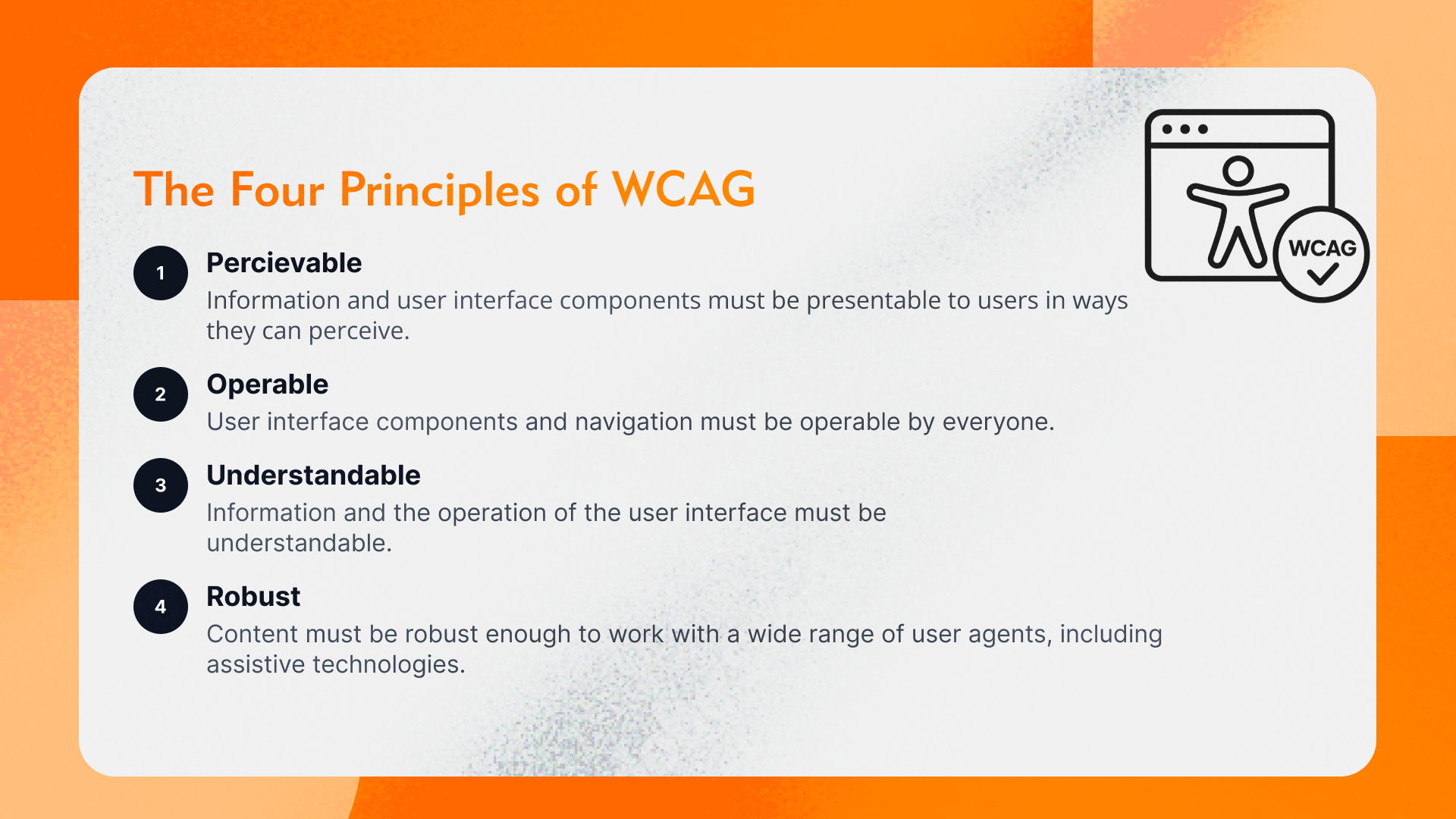
WCAG 2.2 became a W3C Recommendation on October 5, 2023. It adds nine success criteria to WCAG 2.1, six of them at Level A or AA, and the W3C announced in 2025 that it was approved as an ISO/IEC international standard. WCAG is organized around four principles. Content must be perceivable, which means text alternatives for images, captions for video and enough color contrast. It must be operable: everything works with a keyboard, focus is visible and people have enough time. It must be understandable, with clear labels and instructions, predictable navigation and helpful error messages. And it must be robust, built on clean code that works with assistive technologies.
Level AA is the practical target. Level AAA is useful for some content but is not usually required for whole sites. Meeting WCAG 2.2 AA also meets WCAG 2.1 AA, so it is a sensible target for new work. Examples of new 2.2 criteria include a minimum target size of 24 by 24 CSS pixels for most controls, focus that is not completely hidden behind sticky headers or banners, and login steps that work with password managers and copy and paste.
Common accessibility failures
The WebAIM Million 2026 report tested the home pages of the top one million websites in February 2026. It found detectable WCAG failures on 95.9% of them, with an average of 56.1 errors per page. The six most common issues were:
- Low contrast text (83.9% of home pages)
- Missing alternative text for images (53.1%)
- Missing form input labels (51%)
- Empty links (46.3%)
- Empty buttons (30.6%)
- Missing document language (13.5%)
WebAIM notes that these six categories made up 96% of all detected errors, and that addressing them alone would significantly improve accessibility.
Accessible donation forms
Forms are where accessibility and revenue meet. For your donation page and other forms:
- Give every field a visible label connected in the code, not just placeholder text.
- Mark required fields with text, not color alone.
- Announce errors clearly and explain how to fix them.
- Make sure amount buttons, toggles and payment options work with a keyboard and screen reader.
- Avoid time limits, or let people extend them.
Test third-party embedded forms as carefully as your own pages. Donors do not know or care that the form comes from a vendor, and your platform’s accessibility is part of yours.
Documents, video and social
Accessibility is not limited to web pages. The annual report that board members proudly link from the home page is often a PDF that a screen reader hears as one long jumble. PDFs such as annual reports, toolkits and forms need tags, reading order and alt text, or an accessible HTML version. Our guide to annual report design covers this.
Video needs accurate captions and, where visuals carry meaning, audio description or a descriptive transcript. See our video storytelling guide. Avoid images of text, because real text scales, translates and reads aloud. On social posts, add alt text to images and use camel case for hashtags (#GivingTuesday) so screen readers can pronounce them.
Using a third-party service
Several third party service soffer reliable one-stop solution to handle most accessibility requirements. We recommend UserWay and Accessibe as key service providers that are reliable and offer full range of features to ensure website accessibility when manual processes are not effective.
How to test website accessibility
Use three layers of testing. Start with automated scans. Free browser tools find many common issues quickly, but they cannot judge everything; the DOJ guidance itself warns that a “clean” report does not guarantee an accessible site.
Then do manual checks. Put the mouse away and try to make a donation using only the Tab and Enter keys. Zoom to 200% and see what breaks. Check headings, link text and alt text. The W3C’s Easy Checks are a good starting point. Finally, test with people: ask people who use assistive technology to try your top tasks, such as making a donation or finding a program. We find that one session like this often surfaces problems no scan flagged.
Be careful with overlay widgets that promise one-click compliance. They cannot fix every underlying problem in your code and content, and the DOJ guidance advises using automated tools carefully and pairing them with manual review.
Build a website accessibility plan
- Choose a target, such as WCAG 2.2 Level AA.
- Audit your top templates and tasks: home, donate, programs, events, contact.
- Fix high-impact issues first: forms, navigation, contrast, alt text, captions.
- Update your design system: colors, focus styles, button sizes, heading styles.
- Train content editors on alt text, headings, link text and accessible documents.
- Publish an accessibility statement with a way for people to report problems.
- Re-test after every major update and at least once a year.
If a redesign is on the horizon, build accessibility into it from the start. That is usually easier and less costly than retrofitting a finished site. Our website redesign checklist shows where it fits.
Website Accessibility FAQ
Do nonprofit websites have to comply with the ADA?
The DOJ has long said the ADA applies to goods and services offered online. Private nonprofits that serve the public generally fall under Title III, which has no detailed web standard, so WCAG 2.1 or 2.2 Level AA is the usual benchmark. Ask counsel about your specific situation.
What WCAG level should a nonprofit aim for?
Aim for WCAG 2.2 Level AA. It includes all of WCAG 2.1 AA, which is the standard in the DOJ’s Title II rule for state and local governments, plus six newer Level A and AA success criteria.
When do the ADA Title II web rules take effect?
After an April 2026 extension, state and local government entities with 50,000 or more people must comply by April 26, 2027. Smaller entities and special district governments must comply by April 26, 2028.
Can an accessibility overlay make our site compliant?
No tool can do that on its own. Overlays and automated checkers can help find issues, but the DOJ advises using them carefully and pairing them with manual checks. Real fixes happen in the design, content and code.
How do we start making our nonprofit website accessible?
Run an automated scan and a keyboard test on your most important pages, fix forms, contrast, alt text and headings first, add captions to video, train your editors and publish an accessibility statement with contact details.
Content editors can handle much of this day to day, and an outside audit is a good investment for a site with many forms or documents. When accessibility needs to be designed and coded into the site itself, a web team with accessibility experience saves time. Learn how LightMix approaches nonprofit website design.