
A nonprofit website does many jobs at once. It explains your mission, proves your impact, recruits volunteers, serves the people in your programs and asks for money. Without a plan, those jobs compete for the same space and none of them is done well. This guide shows how to build a website strategy before anyone opens a design tool, so every page has a purpose and every visitor has a clear next step.
A nonprofit website strategy is a written plan that links your site to organizational goals. It defines who the site serves, what each audience needs to do, which pages and content support those actions, and how you will measure results. Write it first, then design and build to it.
What a website strategy covers
A website strategy is not a sitemap or a design brief. It is the thinking that comes before both. A useful strategy document answers six questions:
- Goals. What should the website achieve for the organization this year and next?
- Audiences: who visits, and what they are trying to get done.
- Journeys that take each audience from arrival to action.
- Structure and content. Which pages, stories and proof points support those paths?
- Calls to action: what you ask people to do, and where.
- Measurement. Which numbers tell you whether it is working?
Keep it short. Five to ten pages that staff and board members will actually read beat a long deck nobody opens.
Nonprofit website goals and KPIs
Start with your strategic plan or annual fundraising plan, not with the website. Pick two to four goals the site can directly move, then attach a key performance indicator (KPI) to each one.
- Online revenue: one-time and monthly gifts, average gift, donation page conversion rate
- Supporter growth: email sign-ups, event registrations, volunteer applications
- Program reach: service inquiries, resource downloads, eligibility checks
- Advocacy: petition signatures, letters sent to officials, shares
Get a baseline before you change anything. Benchmarks help you judge whether your numbers are normal. In the M+R Benchmarks 2026 study, which covers 2025 data, nonprofits received donations from 1.6% of all website visitors and averaged $1.33 in revenue per visitor. Your own baseline matters more than any industry average, but a benchmark tells you where to look first.
Know your nonprofit audiences
List every group that visits the site, then rank them by how much they matter to your goals. Picture a typical week of traffic. Someone who heard about you on the radio this morning lands on the home page. A monthly donor checks what her gift paid for, and a major gift prospect quietly reads your board list. Volunteers look up the next event. A parent tries to find out whether her family qualifies for a program. A grant reviewer opens your annual report, a reporter needs a quick fact, and a job seeker reads your mission. Staff and board members use it too.
For your top three or four groups, write a short profile: what they already know, what they want, what worries them and which device they likely use. Talk to a few real people in each group. A handful of short interviews can surface things a survey misses, such as a program page that clients cannot find or a donor who wants to see your financials before giving.
Plan for phones from the start. In the same M+R study, mobile devices accounted for 52% of nonprofit website visits, while desktop users still made the majority of donation transactions (57%) and revenue (72%). Your strategy should serve both: fast, simple mobile pages and a desktop experience that supports larger gifts.
Map the key user journeys
A user journey is the path a person takes from arrival to a meaningful action. Map the three to five journeys that matter most. For each one, write down where the visitor comes in (search, email, a social post, a link in an annual report), the question they have when they arrive, the pages or content that answer it, and the action you want, along with the very next step after it.
For example, a first-time donor might arrive from a news story, read a program page, look for proof of results, then give. The program page needs a clear impact statement and a visible donate link. The thank-you page should invite the donor to sign up for updates. Gaps in a journey show you exactly which content to create.
Plan your site structure
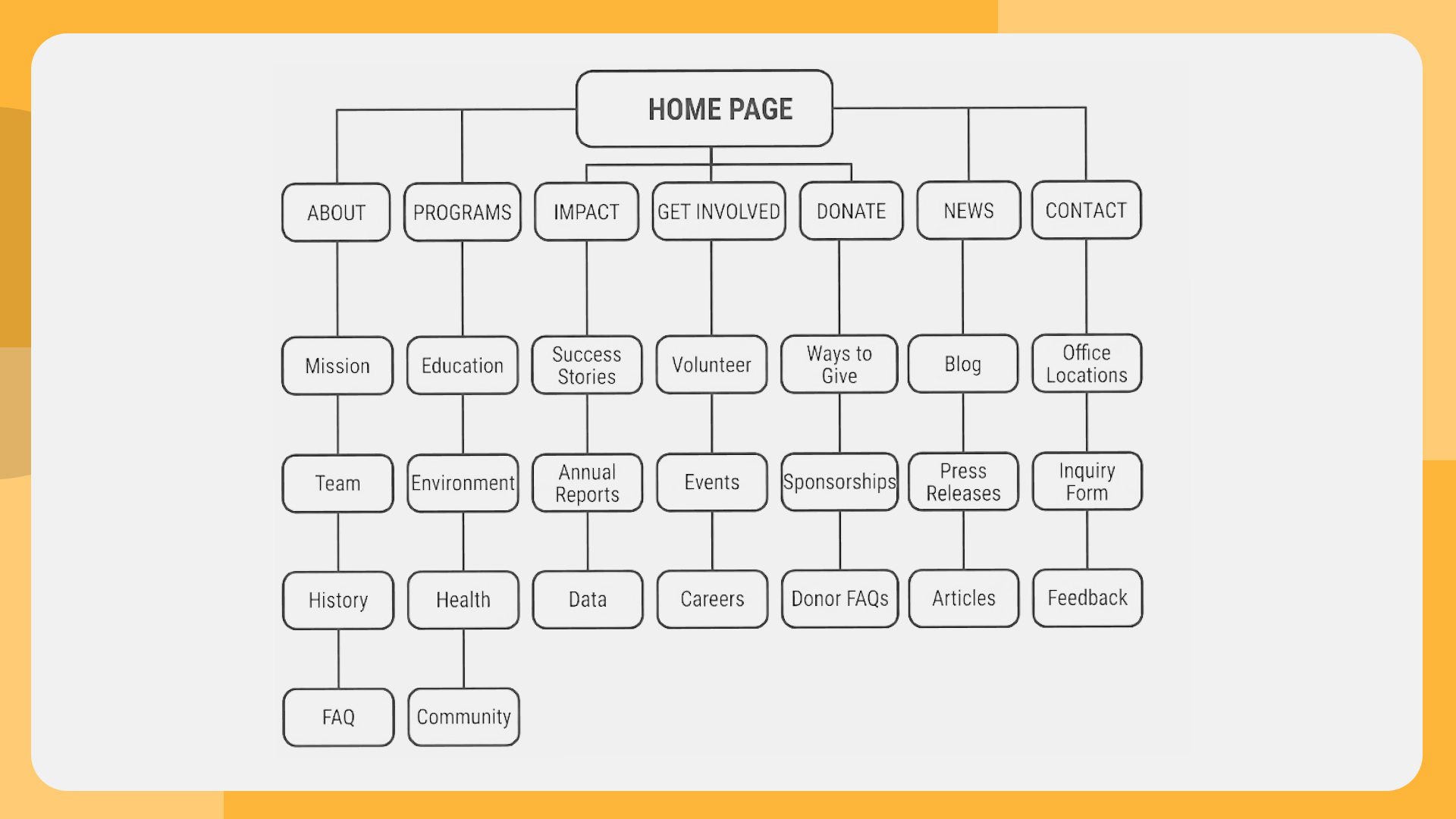
Turn the journeys into a simple sitemap. Group pages by what visitors want to do, not by your org chart. Most nonprofit sites end up with the same core sections. About holds the mission, history, leadership, board, financials and annual reports. Programs (or What We Do) gives each program one clear page that says who it serves and what it achieves, and Impact gathers the outcomes, stories and data. Get Involved covers volunteering, events, advocacy and partnerships.
Donate needs one primary donation page, plus the other ways to give: monthly, tribute, stock and workplace giving. News or Stories shows the work is ongoing, and Contact offers real contact details and a short form.
Keep the main menu to roughly five to seven items. Put “Donate” in the header as a button, not a menu link buried among others.
Content that builds trust
Visitors decide quickly whether an organization is credible, and content does most of that work. It starts with a plain-language mission statement on the home page that says who you help, how and where. Then comes proof of impact: specific outcomes, short stories with photos and a few clear numbers.
Careful donors look for transparency next. They want leadership names, a board list, audited financials or Form 990 links, and recent annual reports. They also notice freshness. A news page whose latest post is two years old, an events page with nothing upcoming and an outdated copyright year all suggest a stalled organization, even when the work is thriving.
Assign an owner to each section of the site. Content without an owner goes out of date within months.
Design calls to action
Every page should have one primary call to action (CTA) and, at most, one secondary option. Match the ask to the visitor’s stage. A first-time visitor reading a program page may not be ready to give, but may join your email list. A returning supporter reading an urgent appeal is ready for the donate button.
Specific labels work better than generic ones: “Give monthly,” “Volunteer at a food drive” or “Get the guide” tells people exactly what happens next. Repeat the main CTA after key content, not only at the top, and send every CTA to a page built for that action, such as a focused donation page with no distractions.
Plan for search and AI answers
Many people find nonprofits through search, and search is changing. M+R reports that organic search still drove 39% of nonprofit website visits in 2025, but that share declined over the year as AI summaries and chatbots answered more questions directly. The study recommends an answer engine optimization (AEO) strategy alongside traditional SEO.
In practice, write pages that answer real questions in the first two or three sentences, and use clear headings, short paragraphs and FAQs. Name your organization, programs, locations and partners the same way everywhere, and keep facts like your mission, service area and contact details identical on your site, social profiles and directory listings.
Eligible charities can also use Google Ad Grants, which provides up to $10,000 USD per month in in-kind search advertising. The program has website quality requirements, which is one more reason to plan content carefully.
Accessibility and speed
Build accessibility into the strategy, not the punch list. An accessible site reaches more supporters and lowers risk. See our guide to nonprofit website accessibility for the standards and a testing plan. Set a page speed target too, since slow pages lose mobile visitors before they read a word.
Measure your website strategy
Set up analytics before launch and track the KPIs you chose, not just page views. Useful tracking includes donation completions, form submissions, email sign-ups, file downloads and clicks on key buttons. Review the numbers monthly with a short list of questions: Which journeys convert? Where do people drop off? Which content brings new visitors?
Then make small, regular improvements. In our experience, a short monthly review does more than a big annual audit, because problems get fixed while they are still small. A strategy is a living document. Revisit it once a year, or sooner if your programs, audiences or goals change. If the gaps are large, a nonprofit website redesign checklist can help you plan the bigger project.
Website strategy checklist
- Two to four website goals tied to the strategic plan, each with a KPI and a baseline
- Ranked list of audiences with short profiles
- Three to five mapped user journeys
- Sitemap organized by visitor tasks
- Content plan with owners and an update schedule
- One primary CTA per page
- Search and AI visibility plan
- Accessibility standard and page speed target
- Analytics and a monthly review routine
Strategy work often goes hand in hand with brand work. For the Global Electronics Council, LightMix paired a brand identity update with a full redesign and rebuild of the organization’s WordPress website, so the new site and the new brand launched with one voice.
Website Strategy FAQ
What is a nonprofit website strategy?
A nonprofit website strategy is a written plan that connects your website to organizational goals. It defines your audiences, the actions you want them to take, the content and structure that support those actions, and the metrics you will use to judge success.
What should a nonprofit website include?
Most nonprofit websites need a clear mission statement, program pages, proof of impact, a focused donation page, ways to get involved, news or stories, transparency information such as leadership and financials, and real contact details.
How do you measure nonprofit website success?
Track the actions tied to your goals: completed donations, donation page conversion rate, email sign-ups, volunteer applications, event registrations and service inquiries. Compare them to a baseline and review them monthly.
How often should a nonprofit update its website strategy?
Review the strategy once a year and whenever your programs, audiences or goals change. Update content continuously, with a named owner for each section of the site.
Does a nonprofit website need to work for AI search?
It helps. AI summaries now answer many questions before people click. Pages that answer questions directly, use clear headings and FAQs, and state facts consistently are easier for search engines and AI tools to understand and cite.
You can do much of this planning in house with a small team and a few focused workshops. A design partner adds value when you need an outside view of your audiences, help turning strategy into structure and design, or a team to build and maintain the site. If that sounds useful, see how LightMix, a design agency in Vienna, Virginia, approaches nonprofit website design.